일렉트론
일렉트론기초-05.React 프로젝트에 일렉트론을 추가하는 법
Code Gear - AI 개발 유튜브 강의 블로그
2021. 9. 29. 20:37
반응형
동영상 강좌
리액트 프로젝트 만들기(create-react-app)
- npx create-react-app "프로젝트명"을 사용하여 React Application을 만듭니다.
npx create-react-app react-electron리액트 프로젝트 실행
yarn start- http://localhost:3000 으로 실행됩니다.
일렉트론 패키지 추가
yarn add --dev electron일렉트론 실행 스크립트 추가
- package.json에 다음과 같이 스크립트를 추가합니다.
"scripts": {
	...
	"electron": "electron ."
},
일렉트론 Entry point 스크립트 추가
"main": "src/main.js",main.js 만들기
- src/main.js 파일을 생성합니다.
- electron-quick-start의 main.js를 복사하여 추가합니다.
const { app, BrowserWindow } = require('electron')
// include the Node.js 'path' module at the top of your file
const path = require('path')
// modify your existing createWindow() function
function createWindow () {
  const win = new BrowserWindow({
    width: 800,
    height: 600,
    webPreferences: {
      preload: path.join(__dirname, 'preload.js')
    }
  })
  win.loadFile('index.html')
}
app.whenReady().then(() => {
  createWindow()
})
app.on('window-all-closed', function () {
  if (process.platform !== 'darwin') app.quit()
})
윈도우에 리액트 URL을 불러오기
- win.loadFile('index.html') 을 다음과 같이 변경합니다.
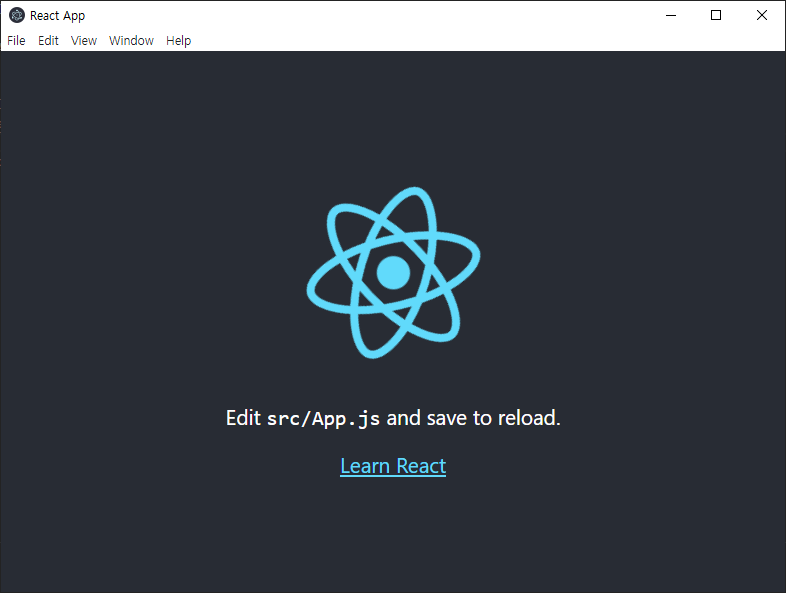
win.loadURL('http://localhost:3000')실행화면
반응형